TikTok Shadowban: How to Check It and What Actually Fixes It
Key data points
- TikTok removed 184,012,576 videos and 86,288,705 fake accounts in the first quarter of 2026— TikTok Community Guidelines Enforcement Report, Q1 2026
- TikTok said in February 2023 that strikes expire from an account's record after 90 days— TikTok Newsroom — Supporting creators with an updated account enforcement system (February 2, 2023)
- 37% of U.S. adults say they use TikTok, and 24% use it daily— Pew Research Center — Americans' Social Media Use 2025 (November 20, 2025)
Officially there’s no such thing as a TikTok shadowban. TikTok’s word for it is “ineligible for the For You feed”, and it can apply to one video or to a whole account. The video stays up. Followers still see it. Strangers mostly don’t, because TikTok stops recommending it, and that’s why the view count collapses. So before deleting posts or changing your hashtags, find out whether it actually happened: TikTok marks it in analytics and in Account check, and plenty of suspected shadowbans turn out to be a normal bad week.
What TikTok actually restricts
There are three different things that get lumped together as a shadowban, and they’re fixed in different ways.
One video is ineligible for the For You feed. It stays on your profile and in search, but it won’t be pushed to new viewers. TikTok’s For You feed standards list what makes content ineligible, and much of it doesn’t break any rule: milder versions of content that would otherwise be removed, unoriginal or reused material with nothing new added, and anything that tries to manipulate people into sending gifts, likes, or follows.
The whole account is temporarily ineligible. When an account keeps posting content that falls short of those standards, TikTok can make the account itself ineligible for recommendation. When TikTok announced this in April 2024, it also said the account and its content would be harder to find in search, that it would notify the creator, and that the creator could appeal.
Specific features are restricted. Comments, direct messages, and LIVE can each be limited on their own. A LIVE restriction can mean you can’t start a LIVE for a while, or that your LIVE sessions get less visibility.
An outright ban is something else again. TikTok shows a banned account a message in the app, so if you can still log in and post, you’re not banned.
| One video ineligible | Whole account ineligible | Feature restricted | Account banned | |
|---|---|---|---|---|
| What you notice | That video’s For You views collapse | New videos get almost no For You views and are harder to find in search | Comments, messages or LIVE are limited | A ban message in the app |
| Where TikTok shows it | The video’s analytics | A notification, and Account check | Account check | The app itself |
| What to do | Appeal if it’s wrong | Appeal, or keep posting within the For You standards until it lifts | Appeal, or wait out a temporary restriction | Appeal the ban |
Check before you assume
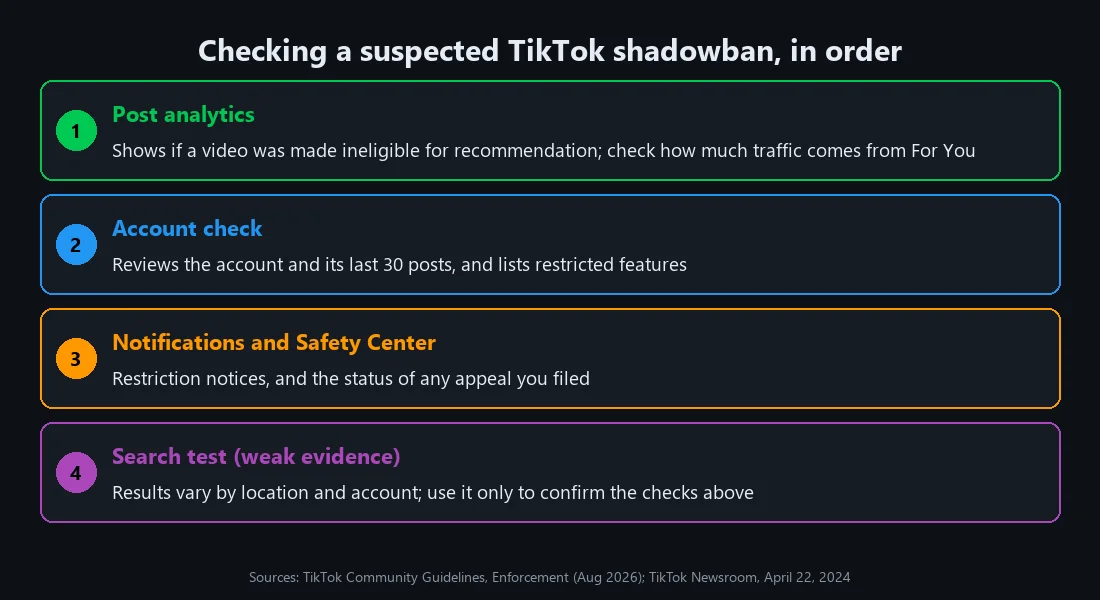
TikTok is more open about this than its reputation suggests. Its current Community Guidelines on enforcement say that when content is made ineligible for the For You feed or otherwise restricted, that information appears in the analytics tool, and that a low view count on its own “doesn’t necessarily mean it broke a rule.” So look in these places, in this order:
- Post analytics. Open the video’s analytics and check whether TikTok has marked it as ineligible for recommendation. Look at the traffic sources too. A healthy video gets a big share of views from the For You feed; a restricted one gets almost all of its views from your profile and from followers.
- Account check. TikTok’s Account check reviews your account and your last 30 posts and shows whether you’re in good standing and whether features like comments or messages are restricted. In recent versions of the app you’ll find it under TikTok Studio’s tools or through Settings and privacy, but TikTok moves these menus between updates, so if the path below your profile looks different, use the app’s search.
- Notifications and the Safety Center. Restrictions come with a notice, and appeals you’ve filed show their status in the in-app Safety Center.
One viral post makes a bad baseline. Line up the traffic sources for your last eight or ten videos instead. A restriction shows as the For You share dropping from most of the views to nearly nothing, on several videos in a row. Same For You share, smaller totals? Then the feed is still serving your videos and fewer people are watching them through, which is a content problem, not an enforcement one.
A fourth test people like is searching for your own video from another account or a logged-out browser. It’s weak evidence. Search results vary by location and account history, and a missing video can just mean it hasn’t been indexed yet. Use it only to back up what analytics already shows.
If all three official checks come back clean, you almost certainly aren’t restricted. The drop is coming from somewhere else.
Low views that aren’t a shadowban
Most sudden drops have duller explanations. A previous video that broke out sets an expectation the next ten can’t meet. Posting at a different time of day, switching topics, or posting less often all change who sees the first few hundred views, and those first viewers decide how far a video travels. Your audience’s interest can also simply move on.
There’s one cause that does involve TikTok directly. When TikTok detects inauthentic followers, likes, or other inflated numbers, its guidelines say it removes them. An account that once bought engagement can see its follower count and its reach shrink at the same time, and that looks a lot like a shadowban even though nothing has been restricted.
For scale, TikTok’s enforcement report for the first quarter of 2026 lists 184,012,576 videos removed and 86,288,705 fake accounts removed. Removal is a separate, heavier action than For You ineligibility, but the numbers show how much automated enforcement runs in the background, and why a few false flags are inevitable.
LIVE restrictions work differently
LIVE enforcement is blunter, which makes it easier to spot. Break a rule during a LIVE and TikTok can cut the session off mid-stream and bar you from going LIVE for a period. The quieter version hits creators whose regular posts keep missing the For You standards: their LIVE sessions get less visibility, or some LIVE features switch off, and nothing gets stopped.
Then there’s gifting. You have to be 18 or older to go LIVE or to send gifts, and TikTok counts gifts from under-18 accounts as ineligible content. Streams built around begging viewers for gifts also run into the rule against manipulating people into giving them.
For a LIVE-focused account, a sudden fall in viewers during sessions that otherwise look normal is worth checking in Account check before blaming the time slot.
What gets an account restricted
Going by TikTok’s own guidelines, the patterns that lead to account-level restrictions are:
- Repeatedly posting content that’s ineligible for the For You feed, even when none of it is removed.
- Inauthentic engagement: bought followers, likes, or views, follow-for-follow schemes, and content asking people to send gifts or likes.
- Policy violations during LIVE. TikTok can stop the session and temporarily restrict the creator from going LIVE; repeated or serious cases can end in a ban.
- Trying to get around an existing restriction.
How do you get out of a TikTok shadowban?
If analytics or Account check shows a restricted post and you think TikTok got it wrong, appeal it in the app. Once it’s filed, you can follow its status in the Safety Center. That’s the route TikTok offers, and TikTok says strikes are removed when an appeal is valid. Appeal the specific post rather than writing to support about the account in general; a vague complaint has nothing for a reviewer to reverse.
If the restriction was fair, stop posting that kind of content and keep posting normally within the guidelines. An account-level restriction is temporary by design. Deleting a flagged video removes it from view, but TikTok has never said that deleting content clears a strike, so don’t count on it.
What doesn’t work
Don’t open a second account to get around a restriction. TikTok’s guidelines name “using another account to avoid restrictions” as a violation in its own right, and its guidelines warn that attempts to get around restrictions can end in an account ban.
A few popular fixes have nothing behind them:
- Clearing the app cache or reinstalling TikTok
- Switching to a Pro or Business account
- Third-party “shadowban checker” websites
- Lists of “banned hashtags”
None of these touch the restriction, which sits on TikTok’s side of the account.
How long does a TikTok shadowban last?
TikTok doesn’t publish a fixed duration. The “14 days” that circulates online has no official source.
On strikes: when TikTok overhauled its enforcement system in February 2023, it said strikes expire from an account’s record after 90 days. The current guidelines don’t restate that figure, so treat it as TikTok’s most recent public statement rather than a guarantee.
Checking an account you didn’t create
Everything above assumes the account is yours. If you’re taking over an account from someone else, whether you’re buying it, renting it, or managing it for a client, its standing matters before you put any work into it. A restriction or a strike history travels with the account.
Ask the current holder to show you, live on a screen share or in a screen recording:
- Account check, with the result for the last 30 posts and any restricted features.
- Analytics for recent posts, including traffic sources. Steady For You traffic is the best sign the account is still being recommended.
- LIVE status, if LIVE is the reason you want the account. TikTok requires the account holder to be 18 or older to go LIVE and to send gifts, and TikTok can temporarily restrict an account from going LIVE after violations, so confirm the option actually works on that account.
- Follower history. A recent large drop can point to fake followers being removed.
Two limits are worth being clear about. TikTok’s terms restrict sharing account credentials and access, and a transfer can breach them even where it’s lawful; our article on the legal side of selling TikTok accounts covers that properly. And taking on a new account to escape a restriction on your own account is exactly the circumvention TikTok prohibits, so it isn’t a fix for a shadowban.
If you do go ahead, pay through a service that holds the money during delivery and a review window, so the checks above happen before the seller is paid — and finish them before the window closes, because on AccountsSale the funds are released automatically 72 hours after delivery unless you open a dispute. Our account verification checklist and the explainer on how AccountsSale’s order hold and review window work cover the rest of what to verify during that window.
Frequently Asked Questions
- How do I know if I'm shadowbanned on TikTok?
- Open the analytics for your recent videos and check whether TikTok has marked any as ineligible for recommendation, then run Account check, which reviews your account and your last 30 posts. A restriction usually also shows as For You traffic dropping to almost nothing across several videos at once. If all of these look normal, you aren't restricted.
- How long does a TikTok shadowban last?
- TikTok doesn't publish a fixed duration for For You feed ineligibility. The 14-day figure that circulates online has no official source. Account-level restrictions are temporary, and they lift sooner when you stop posting the kind of content that triggered them.
- Does deleting videos remove a TikTok shadowban?
- Deleting a flagged video takes it out of view, but TikTok has never said that deleting content clears a strike or lifts an account-level restriction. If you think the restriction was a mistake, appealing it is the route TikTok provides.
- Do TikTok strikes expire?
- When TikTok updated its enforcement system in February 2023, it said strikes expire from an account's record after 90 days. The current Community Guidelines don't repeat that figure, so treat it as TikTok's most recent public statement rather than a guarantee.
- Can I make a new TikTok account to get around a shadowban?
- No. TikTok's Community Guidelines list using another account to avoid restrictions as a violation in its own right, and attempts to get around restrictions can lead to an account ban.