How to Transfer a TikTok Account to a New Owner Safely
Key data points
- Multi-factor authentication blocks more than 99.9% of automated account-takeover attempts— Microsoft Security, 2019
- A deleted TikTok account stays recoverable for 30 days before it is permanently erased— TikTok Help Center: Deleting an account
Most people who lose a TikTok account they paid for don’t lose it because it was fake. They lose it because the person who sold it never actually let go. Paying for an account just moves the login details to you. Transferring it moves something harder to see — who can still reach in and pull the account back. Those two things are not the same, and the gap between them is where buyers get burned.
The rest of this is about that second move: turning a handed-over login into an account that actually answers to you.
Does TikTok even let you transfer an account?
Under TikTok’s rules, no (legality otherwise depends on local law). TikTok’s Terms of Service say you can’t sell, buy, or transfer any part of your account — not the followers, not the username, not the account itself. There’s no “hand this account to a new owner” button anywhere in the app, because as far as the platform is concerned the transfer isn’t supposed to be happening at all.
That matters for a practical reason, not a legal lecture. Because there’s no official handover flow, nothing on TikTok’s side confirms the account is now yours. You don’t get a receipt. What you actually get is whatever recovery paths the previous owner leaves attached, and whatever locks you manage to put on before they change their mind. That’s why fully detaching the account from its old owner matters far more than a handover that merely feels smooth. A smooth handover gets you logged in. Detachment is what keeps you logged in next week.
The four changes that matter, and the order to make them
Four things, in this order: the recovery email, the phone number, the password, and two-factor authentication. The order isn’t cosmetic. Get it wrong and you’ll lock the front door while leaving a window open for the person you just bought from.
Start with the email and phone, because those are TikTok’s recovery keys. As long as the old owner’s email or number is still attached, they can trigger a reset and walk straight back in, no matter how many times you change the password. So pull those off first. On the app, open your profile, tap the menu in the top right, then Settings and privacy, then Account, then Manage account. From there you can change the email and the phone number. You can only do the email swap inside the mobile app, by the way — there’s no desktop option for it, which trips up people who try to do everything from a laptop.
One catch most guides skip: when you change the email or phone, TikTok sends a verification code to the details currently on the account — which, at the start, are still the seller’s. So this step has to happen with the seller present and cooperating: they read you the code, or better, you do it on a screen share while they confirm each prompt. If a seller goes quiet exactly when codes need to be read out, that’s not a scheduling problem. That’s the moment they’re deciding whether to actually let go.
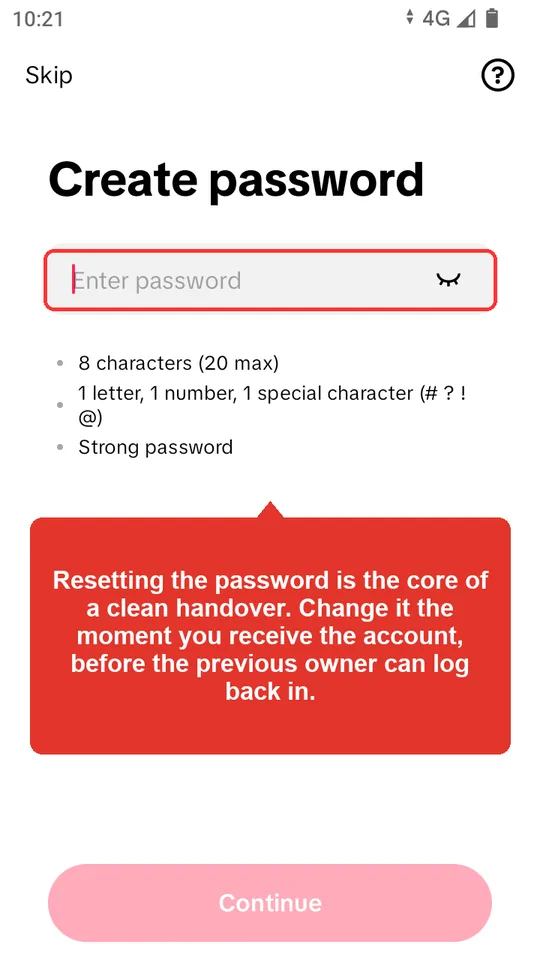
Once the email and phone are yours, change the password — Settings and privacy, then Security, then Password. That kills the seller’s saved login. While you’re in that same Security menu, open the list of logged-in devices and sign out anything you don’t recognize. A password change usually drops other sessions on its own, but checking by hand means a phone you’ve never seen isn’t sitting there still logged in from before the sale. Now the front door is rekeyed and the spare keys are off the old owner’s keyring. There’s one lock left.
How do you actually move two-factor authentication?
Until two-factor verification is set up on your own device, the account still isn’t yours — you just happen to know the current password. And a password by itself is a thin thing to be standing on.
You don’t need the seller’s authenticator app or their phone for this. You set up a fresh second factor on your own device. Go to Settings and privacy, then Security, then 2-step verification. TikTok asks you to pick at least two methods — text message, email, authenticator app — so choose ones tied to the email and number you just moved over, and if you use an authenticator app, scan the QR code into your own app so the rotating codes generate on your phone, not anywhere the seller can see.
Before you finish, check that the seller’s old second factor is actually gone, not sitting alongside yours. Two-factor that lives on the account in two places means two people get the code. The Microsoft security team has put numbers on why this lock is the one that counts: multi-factor authentication blocks more than 99.9% of automated account-takeover attempts. But that statistic only protects whoever holds the second factor. Leave it on the seller’s phone and that protection is quietly working for them, against you.
The clawback window nobody warns you about
Even after you’ve changed everything, the original owner has a stretch of time where they can still try to take the account back. Your real risk isn’t the minute you pay. Attempts are most common in the weeks soon after the sale, while the seller could still have second thoughts, but an ownership claim can also come later.
There are two main routes back in. The first is any recovery email or phone number that didn’t fully come off — one forgotten detail is enough to trigger a reset. The second is an ownership claim filed with TikTok support through the in-app Report a problem flow, backed by the original sign-up email and old login screenshots. A deleted account also stays recoverable for 30 days, which is one more reason to keep a close eye on the account through that first month.
So “I changed everything, I’m safe now” is the wrong instinct. Every old recovery path confirmed dead lowers the risk a lot; it does not remove the chance of a later ownership claim. Paying through a platform doesn’t change that on its own: a reclaim after the payment is released is covered only when the order shows an active Recovery Guarantee, and no current AccountsSale listing offers one.
What if you’d rather not do this on trust?
Run all of that against a stranger from a DM and you still hit the same structural problem every direct deal has: somebody has to move first. You send the money and hope the login works and the seller cooperates on the codes, or the seller hands over the account and hopes you pay. On a forum thread, that hope is the entire safety net.
This is where a payment hold changes the math. The platform holds your payment where the seller can see it but can’t touch it (on AccountsSale, AccountsSale (Official) is itself the seller of every current listing, so the hold is not run by a neutral third party). They give you the credentials, and you walk the whole checklist — email, phone, password, 2FA — with the codes read out as you go. The clock matters: on AccountsSale, the funds are released when you confirm, or automatically when the 72-hour review window after delivery ends without a dispute. If a step fails, open a dispute before release; the funds stay held while an administrator decides, and any refund goes to your AccountsSale wallet balance (wallet withdrawals are currently paused). Once the money is released, ordinary refunds end. You can read how the order hold, review window, and release work before you buy. If you want the checks done before you commit a cent, the same logic is why it pays to verify the account before purchase rather than after.
Account age, level, followers, badge, email, phone, LIVE or Shop access, and policy status are listing claims—not guarantees. Verify every included control at handover. These attributes do not guarantee credibility, algorithmic placement, engagement, revenue, monetization, or permanent control, and TikTok may change eligibility or restrict an account at any time. AccountsSale does not independently guarantee account attributes. Escrow protects the transaction process: an undelivered order is refunded to the wallet automatically after 48 hours, while a refund after delivery requires a dispute opened before release and an administrator decision.
Frequently Asked Questions
- Can you legally transfer a TikTok account to someone else?
- Legality depends on local law, but TikTok's own rules do not allow it: its Terms of Service prohibit selling, buying, or transferring an account, its username, or its followers, and the platform can suspend accounts caught doing it. There's no official transfer button, so what actually changes hands is control — the recovery email, phone, password, and two-factor. Because nothing on TikTok's side confirms the handover, fully detaching the account from the old owner is the buyer's main protection, and a payment hold only covers delivery and the review window.
- What do you change first when taking over a TikTok account?
- The recovery email and phone number, before anything else. Those are TikTok's reset keys: as long as the old owner's email or number stays attached, they can reset the password and walk back in. Pull both off and move them to you first, then change the password, then set up two-factor authentication on your own device. Changing the password first, while the old recovery details are still attached, leaves the account reclaimable.
- How long can the original owner take a TikTok account back after selling it?
- There is no fixed cut-off. Attempts are most common soon after the sale, but they can come later. The old owner can reset through any recovery email or phone that didn't fully come off, or file an ownership claim with TikTok support through the in-app Report a problem flow using the original email and old login screenshots. A deleted account also stays recoverable for 30 days. Confirmed detachment closes the reset routes but not the ownership-claim route; a Recovery Guarantee covers a reclaim only where the order shows an active one.
- Do you need the seller's authenticator app to transfer 2FA?
- No. You set up a fresh second factor on your own device — Settings and privacy, then Security, then 2-step verification — and scan the authenticator QR code into your own app so the codes generate on your phone. The one thing to confirm is that the seller's old second factor is removed, not left running alongside yours, because two-factor in two places means two people receive the login code.